

OpenAI Whisper: The Breakthrough in Speech Recognition
Speech recognition is everywhere these days: we dictate notes, generate subtitles automatically, and translate conversations live. But for a long time, automatic speech-to-text systems were expensive, complicated, or unreliable. That's where OpenAI Whisper comes in. But what exactly is Whisper, and why is it getting so much attention?
What Is OpenAI Whisper?
Whisper is an AI system that converts spoken language into written text. Developed by OpenAI, the creators of ChatGPT, Whisper is open-source and free to use. That means anyone can download, use, and even improve the model.
Unlike many other speech recognition tools, Whisper was trained on a massive dataset: 680,000 hours of audio from the Internet. That makes it particularly robust and versatile. It supports around 99 languages, handling everything from standard German and Swiss German to Spanish and Japanese — even regional dialects.
How Does OpenAI Whisper Work?
Whisper uses advanced transformer models, AI structures that have proven extremely effective in recent years. These models learn to detect patterns in data, in this case, spoken words and phrases.
Whisper stands out for its ability to work well even under challenging conditions. Background noise, unclear pronunciation, or technical jargon? No problem. It handles these hurdles better than most.
It also adds punctuation and capitalization automatically, delivering clean, readable text ready to use for subtitles, transcripts, or documentation.
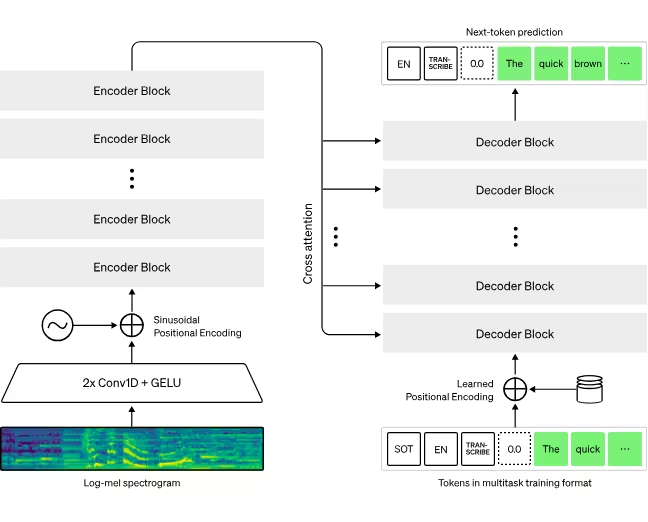
Whisper Model Variants at a Glance
Whisper comes in several versions depending on your need for speed vs. accuracy:
Tiny and Base
These are the smallest and fastest models - perfect when speed matters more than perfect accuracy. They work well on standard laptops without a dedicated GPU or large amounts of RAM. Accuracy may be lower depending on language and audio quality, but they're great for quick dictations or rough notes.
Small and Medium
These offer Better accuracy with moderate hardware requirements. A laptop with 8-16GB of RAM and a modest GPU (like a GTX 1650 with 2—4GB of VRAM) is enough. Even without a GPU, they still run on strong CPUs, just a bit slower. Ideal for meetings, interviews, and more detailed dictation.
Large
This model offers the highest accuracy but requires powerful hardware, ideally a modern GPU. If you need top-tier results, such as for subtitling or research, this is your go-to. The most recent open-source release is Large-v3.
There are also English-optimized versions (like Base.en) for even better performance in English-only use cases.
Large-v3-turbo
In late 2024, OpenAI added a turbo model to the family. Large-v3-turbo is a pruned, fine-tuned version of Large-v3 that reduces the decoder layers from 32 to 4. The result is a model that runs substantially faster with only a small drop in accuracy. One caveat: unlike Large-v3, turbo was not trained for translation, so for speech translation into English the standard Large-v3 or Medium models are the better choice.
| Model | Parameters | Approx. VRAM | Relative speed | Good for |
|---|---|---|---|---|
| Tiny | 39M | ~1 GB | Fastest | Quick notes, runs without a GPU |
| Base | 74M | ~1 GB | Very fast | Rough drafts on standard laptops |
| Small | 244M | ~2 GB | Fast | Meetings, interviews, dictation |
| Medium | 769M | ~5 GB | Moderate | Higher accuracy, also supports translation |
| Large-v3 | 1.55B | ~10 GB | Slowest | Maximum accuracy, subtitling, research |
| Large-v3-turbo | 809M | ~6 GB | Much faster than Large | Near-Large accuracy at higher speed (no translation) |
Parameter and VRAM figures are the values published by OpenAI for the open-source models; real-world speed still depends heavily on your hardware.
How to Use OpenAI Whisper
You can install and run Whisper locally on your computer, usually via Python. Once installed, just load your audio file and let Whisper do the work.
Here's a simple Python example:
import whisper
model = whisper.load_model("small")
result = model.transcribe("recording.mp3")
print(result["text"])
For larger tasks or if you prefer not to use your own hardware, you can also access speech-to-text via APIs (including directly from OpenAI), sending audio files and receiving transcriptions in return. OpenAI's API still offers the original Whisper endpoint (whisper-1), but in March 2025 it also introduced newer speech-to-text models, gpt-4o-transcribe and gpt-4o-mini-transcribe, which OpenAI reports as more accurate than the original Whisper models, along with realtime streaming transcription. These newer models run only through the API and are not open-source downloads like the classic Whisper models.
The Strengths of OpenAI Whisper
Whisper has quickly become a favorite and for good reason:
Very High Accuracy
Whisper often outperforms commercial services like Google or Microsoft. Independent tests have shown word error rates (WER) under 8%, compared to 12-15% for many competitors. It handles tough audio conditions, heavy accents, and background noise with ease.
Multilingual Capabilities
Whisper's support for nearly 100 languages makes it ideal for international organizations. It adapts well to global meetings and multilingual projects, all without needing manual language switches.
Free and open source
You can use Whisper for free if you run it locally. That makes it appealing to both individuals and businesses looking for a cost-effective solution.
Data privacy via local processing
Since Whisper runs locally, your audio never leaves your device. That's a major advantage for sensitive environments like law, medicine, or finance, where data protection is a must.

Active Community and Continuous Development
Thanks to its open license, Whisper is constantly evolving. Developers worldwide are adding features, fixing bugs, and expanding its capabilities.
The Downsides of OpenAI Whisper
No tool is perfect. Here are a few limitations to be aware of:
High hardware requirements
The Larger models need serious power, around 10 GB of VRAM for the large model, and are much faster with a modern GPU. Without one, transcription can take significantly longer. Smaller models are more accessible but less precise.
No Built-In Speaker Identification
Whisper can't distinguish between speakers. For detailed protocols or podcasts, you'll need extra tools to label who said what.
Language Gaps
Whisper excels with major languages like English and German. For less common languages (like Icelandic, Welsh, or Swahili), accuracy can drop due to limited training data. Strong dialects can also lead to misinterpretation.
Not a Plug-and-Play Cloud Solution
Whisper is built for local use and requires a bit of technical setup. If you want a simple, cloud-based tool that just works out of the box, try Sally, a purpose-built meeting AI that transcribes and analyzes conversations in real time with no setup required. Sally joins your Zoom, Microsoft Teams, Google Meet and Webex meetings, and it is GDPR-compliant and hosted on German servers.

Who Should Use OpenAI Whisper?
Whisper is likely the best free option for high-quality speech recognition right now. Professionals who need accuracy and control over their data will love it.
Private users and small teams who are willing to do a bit of setup can also benefit, getting a powerful, privacy-friendly tool at zero cost.
If you want to get started instantly, with Automatic summaries, live transcription, and seamless integration into your workflows, start with Sally for free, designed for simplicity and immediate use.


