

Speech recognition sounds futuristic, but it's already part of everyday life. You speak, a system listens, and the result is text. That’s the core idea: a computer should understand spoken language well enough to generate a reliable written version.
In business, this is especially exciting because language is constantly being produced in meetings, calls, and interviews—but rarely documented cleanly.
It’s important to make a quick distinction: speech recognition answers the question “What was said?” Speaker recognition also answers “Who said it?” Both often appear together in practice, but they solve different problems.
This article gives you a clear yet well-grounded overview. You’ll learn how speech recognition works technically, how the methods have evolved over time, the difference between classic and modern approaches, and where the limitations lie. We'll wrap up with a look at how tools like Sally AI are already putting speech recognition to work in everyday meetings.
A Brief History
The first speech recognition systems emerged back in the 1960s. At the time, their capabilities were very limited: they could recognize individual words or small word lists, mostly under lab conditions.
A major breakthrough came later when researchers began modeling speech statistically. Starting in the 1980s, language models became popular. These models learned from large amounts of text which word sequences commonly appear together. That was a huge help in distinguishing similar- or identical-sounding words based on context.
In the 1990s, dictation software gained traction in office environments as PCs became faster. Still, using these tools was often frustrating—requiring training, manual corrections, and dealing with limited accuracy.
The real leap forward came in the 2010s with the rise of deep learning. Neural networks could recognize patterns in audio signals far better than older methods. Since then, speech recognition has become so effective that it's now standard in smartphones, video calls, and enterprise software.
The Basics of Speech Recognition
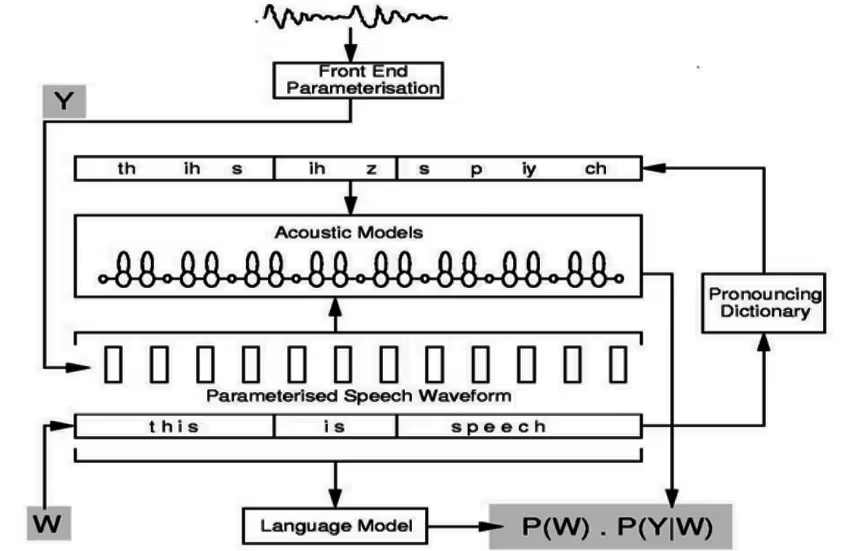
To turn spoken language into text, a system needs to go through several stages. You can think of it as a chain, where each link has a specific role.
The process starts with recording the audio. This is a continuous signal—a wave that changes over time. For a computer to process it, the signal is broken down into tiny segments, often just a few milliseconds long.
Next comes feature extraction. Instead of working with the raw waveform, the system calculates specific features from each short segment that are typical for speech. These features roughly describe how energy is distributed across different frequencies. It sounds technical, but the idea is simple: the system looks for recognizable patterns that match particular sounds.
In traditional systems, three core components follow:
- Acoustic model: Estimates which sounds or phonemes are most likely being spoken.
- Lexicon (pronunciation dictionary): Knows how words are usually pronounced and how sounds combine to form words.
- Language model: Evaluates which sequence of words is most likely in context.
Finally, a decoder determines the most probable word sequence—essentially, which interpretation of the audio has the highest overall likelihood.
A simple example: the audio might be ambiguous between "to", "too", and "two". The language model helps here since it can differentiate using context.
Classic Methods: HMMs and N-Grams
To understand speech recognition over the past few decades, you need to know two key concepts: Hidden Markov Models (HMMs) and N-gram language models.
Why HMMs Are a Good Fit
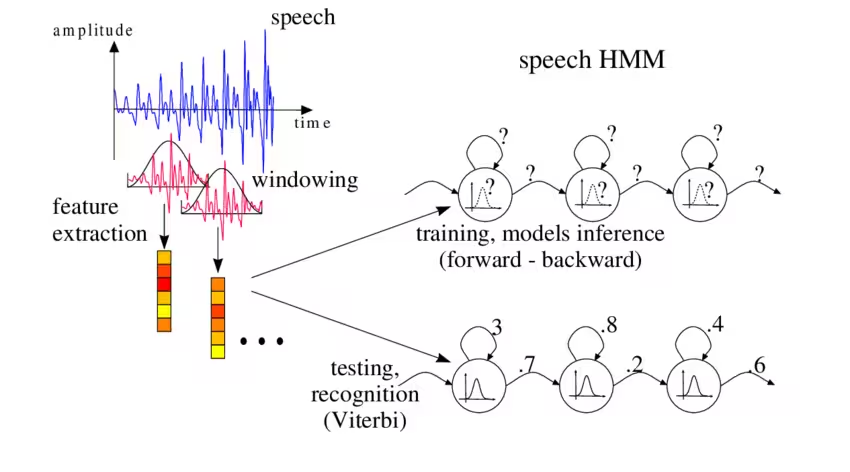
Speech is a time-based process. Sounds occur in sequence, and the exact duration of each sound can vary. HMMs are designed for exactly this: they model states that evolve over time and can handle uncertainty.
In a traditional speech recognizer, the "hidden states" roughly represent linguistic units—such as phonemes or parts of phonemes. The system doesn’t observe these states directly; it only has access to the audio signal. Its task is to estimate which sequence of states is most likely to have produced the observed audio.
In earlier systems, Gaussian Mixture Models (GMMs) were often used to describe what the features of a given sound might look like. Later, these acoustic components were frequently replaced with neural networks—but the underlying HMM framework initially stayed the same.
N-Grams as Language Models
An N-gram model is a statistical method that learns from text data how likely a particular word sequence is. The "N" indicates how many words of context are taken into account.
- A bi-gram looks at the previous word.
- A tri-gram considers the two previous words.
This is extremely useful because it helps solve a common problem: many words sound alike. With context, it becomes easier to make the right choice.
However, the weakness is just as clear: N-gram models only consider a short span of context. They struggle to capture complex meaning that spans an entire sentence or paragraph.
Still, for many years, the combination of HMMs and N-gram models was the standard in speech recognition. These systems were easy to explain, reasonably stable, and could be fine-tuned effectively.
Modern Methods: Deep Learning and End-to-End Systems
Deep learning has fundamentally transformed speech recognition. Instead of building and training many separate components, large neural networks can now learn patterns directly from raw data.
DNN-HMM: The Hybrid Transition
A key step in this evolution was the hybrid model. In these systems, the HMM framework remained in place to handle time-based processing, but the acoustic model was replaced with a deep neural network (DNN).
These DNN-HMM systems quickly outperformed older models because neural networks are better at recognizing complex patterns in audio signals.
The big advantage: teams could retain the familiar HMM decoding process while benefiting from the power of deep learning.
End-to-End: From Audio Directly to Text
Today, end-to-end models dominate many real-world applications. "End-to-end" means the model learns to convert audio into text directly—without needing separate modules like a lexicon or a traditional language model.
Common end-to-end approaches include:
- CTC-based models: Learn to align audio steps with text symbols.
- Attention-based encoder-decoder models: Learn which parts of the audio correspond to which pieces of text.
- RNN-Transducers (RNN-T): Designed for streaming scenarios where text should appear as speech is ongoing.
- Transformer models: Now widely used across language tasks, including ASR (Automatic Speech Recognition).
One major advantage of modern models is flexibility with words. Many systems work with subwords or characters, which helps handle names, technical terms, or newly coined words. They’re no longer limited by a fixed dictionary.
In practice, hybrid approaches are still common: end-to-end models might be combined with external language models, or enhanced through neural rescoring techniques. This shows that there’s no single best solution—just many smart engineering choices.
Technical Challenges and Limitations
Even though speech recognition has become remarkably accurate, it still struggles under difficult conditions. The main reasons are usually very straightforward: speech is highly variable, and every human voice is different. Here are the key challenges:
Audio Quality
Poor microphones, echoey rooms, or overlapping speech can significantly reduce accuracy. Background noise, speaking at the same time, or being too far from the mic are all common problems.
To get the best possible results, aim for:
- A quiet room
- A good microphone placed close to the speaker
- An orderly conversation
Under these conditions, recognition quality is typically excellent.
Variability of Speech
People speak differently. Accents, dialects, speaking speed, emotions, and individual pronunciation all make the task harder. This isn’t a bug—it’s just how language works.
To improve recognition, it helps if the system’s lexicon also includes regional dialects (e.g., Swiss German, Bavarian, or Berlin dialects).
Technical Terms, Names, and Numbers
Jargon, brand names, abbreviations, and customer names are particularly challenging. Solutions include customized vocabularies or domain-specific training.
Look for tools that support user-defined vocabulary to handle these cases effectively.
Punctuation and Readability
Many systems initially transcribe just the word sequence. Punctuation, capitalization, and formatting must be added separately to make the result readable.
Modern systems often include AI models that handle this automatically. Still, 100% error-free results are rare—and technically impossible to guarantee. For sensitive fields like legal or medical dictation, human review is still standard and highly recommended.
Data Privacy and Compliance
While not a technical issue in the transcription itself, data protection is a major factor in business contexts. Accuracy is important, but so is control over your data.
If audio is processed in the cloud, you need to know:
- Where the data is stored
- How it’s secured
- Who has access
For European companies, GDPR compliance is a key consideration. Technologies that enable on-device processing (on-premise ASR) are gaining popularity—letting you avoid third-party data centers.
However, this often comes at the cost of lower recognition quality, since mobile devices have far less computing power.

Common Use Cases
Speech recognition is already part of everyday life—and several use cases are steadily becoming mainstream. Here are some typical scenarios:
Voice Assistants & Automation
On smartphones and smart speakers, voice input is now routine—Siri, Google Assistant, Alexa & co. let you retrieve information, schedule appointments, or control devices by voice.
In office settings, you can use voice commands to update calendars, set reminders, or interact with chatbots. Hands-free systems in cars also rely on speech recognition to control navigation or answer calls safely by voice.
Call Centers and Customer Service
Speech recognition is used in two key ways here:
- IVR phone systems that understand spoken requests (e.g., “Please briefly state your request...”), replacing old-school button menus.
- Automatic transcription of calls between customers and agents. These transcripts can be analyzed for common issues, tone of voice, or quality control—without needing someone to listen to every call.
Meetings and Internal Communication
No one likes taking notes in meetings. This is where meeting assistants come in (more on this later): they record the conversation, transcribe it in real time, and generate summaries, tasks, and follow-ups. This ensures nothing important gets lost, and everyone can focus on the discussion.
Dictation & Documentation
In many industries, voice is increasingly replacing the keyboard. Doctors dictate directly into electronic health records (medical speech recognition), inspectors record findings verbally, and managers draft emails by speaking.
Professional dictation software (now often cloud-based) transcribes continuously, saving time. Tools like Microsoft Word or Google Docs now offer built-in voice typing features that are surprisingly accurate—thanks to AI-powered speech recognition behind the scenes.
Security & Access Control
Speech recognition is also used for voice control (e.g., of machines) or—combined with speaker recognition—for authentication.
A common example: banking hotlines that verify your identity by voice (“Your voice is your password”). In smart home systems, you can unlock doors or control alarms by voice (linked to permissions).
But security matters here: misrecognition can have serious consequences, so safety considerations are critical.
Common System Architectures
System architecture varies based on the use case, software, and deployment model. Today, cloud-based systems are widespread—but they’re not the only option.
Three key architectural decisions:
On-Device vs. Cloud
- On-Device: Speech recognition runs directly on the device.
- Pros: Greater data control.
- Cons: Limited computing power.
- Cloud: Audio is sent to a server for transcription.
- Pros: Powerful models, frequent updates.
- Cons: Requires robust data protection processes.
Streaming vs. Batch
- Streaming: Produces text in real time—ideal for live captions.
- Batch: Transcribes after recording—better for long meetings or audio files.
Pipeline vs. End-to-End
- Pipeline: Traditional setup with separate acoustic model, lexicon, and language model.
- End-to-End: One integrated model that converts audio directly into text.
In practice, many systems blend these approaches. What matters most is choosing an architecture that fits your needs.
Modern Use with Sally AI
In today’s business world, speech recognition is most valuable when it doesn’t just produce text—but translates speech into actionable outcomes. That’s where Sally AI comes in.
Sally uses speech recognition to automatically transcribe meetings. Then, AI processes the text to generate summaries, highlight key points, and identify tasks.
This creates value in two steps:
- Speech is reliably turned into text.
- The text is structured into something you can directly use.
Typical benefits include:
- A clear summary instead of a full-length recording
- Automatically extracted tasks and next steps—no need for manual minutes
- Searchable content, so you can quickly find key decisions or discussions
For businesses, it’s also crucial that tools like Sally integrate into existing workflows—connecting to CRMs or task managers. Sally does just that. Speech recognition becomes more than just transcription—it’s a building block for smoother day-to-day operations.
Conclusion
Speech recognition is the technology that converts spoken language into text. It has evolved from early experiments with word lists into highly accurate systems now embedded in smartphones, video calls, and enterprise software.
Here’s the rough timeline:
- Initially: Classic pipelines using HMMs and N-gram models
- Later: Hybrid systems with DNN-HMM
- Now: End-to-end approaches using CTC, RNN-T, and Transformers
But speech recognition isn’t magic. Audio quality, accents, technical terms, and data privacy remain real challenges.
If you account for these factors, though, speech recognition becomes a powerful tool—especially in business settings.
And that’s where Sally takes it to the next level: Sally AI uses speech recognition not just to generate text, but to turn meetings into clear, usable results. That’s the moment when technology becomes real productivity.
You can try Sally for free—no payment details required.


